

Introduction
Welcome to our technical blog, where we make complex concepts accessible to everyone, regardless of their background. Today, we're diving into an exciting project: developing a Large Language Model (LLM) Agent that can adapt to various tasks.
We'll be creating a robust Retrieval, Augmentation, and Generation (RAG) infrastructure to help us select the most suitable LLM for each task. Companies like H2O and HuggingFace have already launched similar systems, and we've received interest from startups eager to integrate our AI technology into their applications.
Our particular use case requires the ability to prompt the LLM using a single input (one-shot) or by chaining together multiple prompts. This necessitates creating customizable and user-friendly LLM modules for various scenarios.
Stay tuned as we embark on this journey, breaking down each step in a simple and engaging manner.
Current Use-Case
In our current use case, we enhance the content of a user's resume through a two-step process:
-
Input: The user inputs the "Professional Summary" and "Experience" sections of their resume into the system and queries the LLM to generate a more polished version of the text.
-
Review: The user reviews the LLM-generated content and provides additional prompts or guidance to refine and personalize the output, ensuring it aligns with their unique skills and experiences.
By following this approach, users can leverage the power of the LLM to craft a compelling resume that stands out to potential employers.
Target
We aim to build a fully customizable LLM module that supports our use case and at least partially automates the resume creation process.
Implementation
Step 1: Choosing the LLM
When selecting the right LLM for your needs, there are two main categories to consider: open-source LLMs and proprietary LLMs. We'll discuss popular options from both groups, focusing on the benefits of choosing open-source LLMs.
Open-Source LLMs
Examples: Mistral AI, Phi 3, LLaMa 3.
Advantages:
- Community Support: Large, active communities of developers and users provide guidance, share resources, and collaborate on improvements.
- Customizability: Access to the source code allows modifications and adaptations to suit specific use cases.
- Transparency: Understanding the inner workings of the model is crucial for applications with strict ethical or privacy guidelines.
Proprietary LLMs
Examples: GPT-4.
Advantages: Impressive performance and unique features.
Limitations:
- Lack of Customizability: Limited to using the model as-is.
- Cost: Usage-based fees can add up over time.
- Opaque Nature: Difficult to understand the underlying mechanics, which can be a concern for those prioritizing transparency and explainability.
In conclusion, while both open-source and proprietary LLMs have their advantages and disadvantages, open-source LLMs like Mistral AI, Phi 3, and LLaMa 3 offer accessibility, customizability, and transparency that can be highly beneficial for a wide range of users.
Step 2: Looking at Costs and Features
Open-source LLMs are usually cost-effective as they can be hosted on your own servers or with providers like Azure or AWS with a pay-as-you-go model. Here's a summary of the costs and features of hosting various LLMs:
| LLM | Details | Context Length | Cost |
|---|---|---|---|
| Mixtral 8x7B | MoE LLM by Mistral AI | Trained: 8192 tokens, Total: 32768 tokens | $0.7/1M tokens (cheapest on Mistral, available on AWS and Azure) |
| Mixtral 8x22B | Successor to Mixtral 8x7B | Trained: 32768 tokens, Total: 65536 tokens | $2/1M tokens (available on Mistral and Azure) |
| LLaMa 3 70B | Non-MoE model by Meta | Trained: 2048 tokens, Total: 8192 tokens | $0.02/1K tokens (Azure, cost-effective compared to AWS) |
| Phi 3 128K | Multimodal-SLM by Meta | Trained and Total: 32064 tokens | $0.002/1K tokens (Azure) |
| GPT-4 Turbo | Proprietary LLM by OpenAI | 16K default, higher tier models up to 128K | Not available on AWS |
Step 3: Testing Using Public APIs Compliant With OpenRouter
Selecting and testing the best LLM requires a streamlined way to access and evaluate different models. OpenRouter, an open-source API standard, enables seamless switching between various AI models and services. We've chosen Fireworks AI as our provider because:
- Model Diversity: Offers a wide variety of AI models, including popular open-source LLMs like Mistral AI, Phi 3, and LLaMa 3.
- Ease of Integration: Adheres to the OpenRouter standard, simplifying integration into existing infrastructure.
- Scalability: Designed to handle high volumes of requests and scale seamlessly.
Here's a sample function to invoke model responses and the latency results using the same hardware:
import json

def get_sanitized_json_response(user_input, guardrail):
    final = chain.invoke({"text": f"Sanitize {user_input}. Guardrail: {guardrail}"})
    final = chain.invoke({"text": final.content})
    return json.loads(final.content.replace("<json>", "").replace("</json>", "").replace("\n",""))
| Model | Latency | Remarks |
|---|---|---|
| Mixtral 8x7B | 2.1s | Lightest model, performed well, followed all instructions. |
| Mixtral 8x22B | 5.3s | Successor model, similar response quality, higher latency due to size. |
| LLaMa 3 70B | 2.6s | Decent response but did not follow the prompt as expected. |
| Phi 3 128K | 1.5 min | Multimodal model with vision capabilities, followed the prompt similarly to Mixtral models. |
A very simple guardrail and input was used to test the above:
guardrail = """Format details as bullets and use the XYZ method to format the relevant detail.
            For example:
            - I did X boosting Y percent resulting in Z.
"""
We got the following sanitized json response after it was invoked:
get_sanitized_json_response("""I served as Junior as a Software Engineer at TechCorp in Sydney in January 2011 and worked there until December 2018. During my tenure,
                            I led the team that developed advanced AI-driven financial analytics tools for processing hundreds of millions of records in a
                            distributed environment and created the initial version of the company's proprietary data pipeline. In my role, I was responsible for
                            designing solutions and implementing multiple APIs. In my last year managing a team focused on blockchain solutions.""", guardrail)

{'experience': [{'title': 'Software Engineer',
                'company': 'TechCorp',
                'location': 'Sydney',
                'start_date': '2011-01',
                'end_date': '2018-12',
                'highlights': ['- Engineered scalable database systems of a major project that improved client data processing speed by 40%.',
                              '- Spearheaded a team focused on AI-driven solutions.',
                              '- Developed AI-driven financial analytics tools processing 100M+ records in distributed environments.',
                              '- Created company\'s proprietary data pipeline.',
                              '- Managed team on blockchain solutions in final year.']}]}
In conclusion, since the response quality was fairly comparable among all these models, it came down to latency and cost. The experiment was run 3 times achieving very similar results. So we chose Mistral AI's Mixtral 8x7B due to its favorable balance of latency and cost.
Step 4: Building an Orchestration Layer
Managing and coordinating multiple large-scale language models or a single model across various applications is crucial for optimal performance and adaptability. Instead of building from scratch using vanilla PyTorch, employing an orchestration framework is more practical and efficient. Here are three options:
Langchain
Advantages: Vast array of integrations, supports Python and JavaScript, extensive community support.
Drawbacks: Introduces an additional dependency, potential learning curve.
LlamaIndex
Advantages: Backed by Meta, offers interoperability with Langchain.
Drawbacks: Less developer-friendly syntax.
Haystack
Advantages: User-friendly syntax, supported by prominent tech corporations.
Drawbacks: Limited integrations as it's still maturing.
Using an orchestration framework simplifies development, improves scalability, and provides access to a supportive community, making it a more favorable choice for our project.
Design and Data Flow
The following image shows the design diagram:
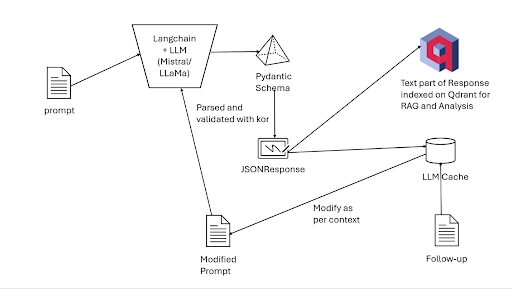
The data flow within our AI-driven system is an essential aspect of ensuring a seamless and efficient user experience. While the design diagram provides a visual representation of the process, a detailed explanation can help clarify the steps involved:
-
User Input: The journey begins when the user enters their details, such as the "about" and "experience" sections of their resume, into the system.
-
Prompt Generation: The user's input is then processed and transformed into one or more prompts, which will be used to query the Large Language Model (LLM) for a more polished and impressive version of the text.
-
LLM Integration via Langchain: The generated prompts are passed to Langchain, our chosen orchestrator framework, which facilitates the interaction with the LLM client. Langchain leverages a Pydantic schema in the form of a class to parse and validate the data using kor, ensuring that it adheres to the required format.
-
JSONResponse Generation: Once the data is validated, it is converted into a final JSONResponse, a structured and easy-to-work-with data format that simplifies further processing and manipulation.
-
Content Extraction and Indexing: The content part of the JSONResponse is extracted using kor and indexed by computing embeddings, which are mathematical representations of the text. These embeddings are then stored in a vector database, such as Qdrant, for efficient retrieval and comparison during subsequent queries.
-
Caching for Context Module: The entire JSONResponse is cached for the context module to function correctly. This ensures that the system can maintain the context of the user's input and the LLM's output during follow-up queries.
-
Follow-up Queries: When the user provides additional input or requests further refinement of the generated text, the cached JSONResponse is modified according to the new context and chained to the updated prompt. This modified prompt then goes through the entire process again, from LLM integration to content extraction and indexing, to provide the user with a tailored and accurate response.
By understanding the data flow within our system, we can appreciate the importance of each step and the role of the orchestrator framework in streamlining the process, ultimately resulting in an efficient and user-friendly AI-driven solution.
Prompt Building and Chaining using LCEL
This is an example of a sample PromptTemplate:
from langchain.core.output_parsers import PydanticOutputParser
prompt = PromptTemplate(
    template="Please extract the following information from the given text and format it as a JSON object according to the schema:\n\n{format_instructions}\n{query}\n",
    input_variables=["query"],
    partial_variables={"format_instructions": output_parser.get_format_instructions()},
)

chain = prompt | chat_model | output_parser
A typical template consists of two main arguments (there are more but that is out of this blog's scope) which are input_variables and template. The first argument accepts a list of strings that would be injected into the prompt template at runtime. This variable typically acts like those of the Jinja2Template or f-strings. The chat_model here would be the LLM that we are using and is being chained to the prompt. The | (pipe) operator similar to the BASH | operator represents a chain. This is a convenient short-hand given by the LCEL (LangChain Expression Language) spec. This would allow us to chain the response of one prompt to an input of another. It also supports function-calling, in other words one can chain lambda expressions or some functions to typically sanitize the output. This reduces complexity of code by simply writing chains instead of large functions.
Step 5: Using VectorDBs
Vector databases (VectorDBs) store, manage, and efficiently search high-dimensional vectors, such as text embeddings generated by LLMs. Here's a comparison of popular options:
Qdrant
Advantages: High performance, easy integration, active community.
Drawbacks: None significant.
Milvus
Advantages: Multiple distance metrics, data visualization tool.
Drawbacks: Steeper learning curve.
Chroma
Advantages: Easy-to-use Python API, modular design.
Drawbacks: Relatively new, less extensive community support.
PGVector
Advantages: Leverages PostgreSQL's capabilities, SQL-based queries.
Drawbacks: Less performant for high-dimensional vector search.
FAISS
Advantages: High-performance search, GPU support.
Drawbacks: Requires integration with other databases.
Qdrant's scalability, ease of integration, and active development make it a suitable choice for our AI-driven solution.
Leveraging VectorDBs as a Robust IR Solution
Creating an Information Retrieval (IR) solution using VectorDBs involves:
-
Text Preprocessing: Clean and preprocess raw text data.
-
Text Embedding Generation: Convert preprocessed text into high-dimensional vectors using an LLM.
-
Storing Embeddings in VectorDB: Index embeddings for efficient search.
-
Query Processing: Preprocess and convert user queries into embeddings.
-
Similarity Search: Perform similarity search in VectorDB to find relevant embeddings.
-
Ranking and Displaying Results: Rank retrieved embeddings and convert them back to text for display.
By following this process and utilizing VectorDBs, we can build an efficient and effective IR system.