
In today's digital job market, your resume rarely gets read by a human first. Instead, it's often scanned by something called an ATS—an Applicant Tracking System. Consider it like a gatekeeper: it filters, ranks, and decides whether your resume even reaches a recruiter's desk.
So if your carefully crafted resume has been getting ghosted, it's not necessarily because you're not qualified—it might just be because the ATS didn't like your format, keywords, or file type.
But don't worry. Beating the bots doesn't mean becoming one. In this blog, we'll break down exactly what an ATS is, how it works, and how to get past it without sounding like a robot.

What is an ATS?
An Applicant Tracking System (ATS) is a software platform used by recruiters and companies to collect, organize, and evaluate job applications. It scans resumes for relevant keywords, skills, experience, and formatting to determine if a candidate matches the job description. It helps recruiters save time by shortlisting only the resumes that meet basic requirements—based on automated rules, not human instinct.
📊 Fun fact: More than 98% of Fortune 500 companies use an ATS.
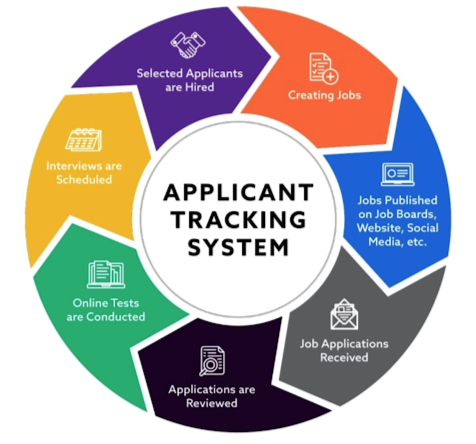
How Does an ATS Work?
- The job listing is uploaded into the ATS.
- You apply with your resume (often via a company's career portal).
- The ATS scans your file for specific words and phrases (called keywords).
- It scores your resume based on how closely it matches the job posting.
- Only top scorers move forward to human review.
So yes—your resume is basically graded by a machine.
Why Most Resumes Fail the ATS Test
Even strong candidates get filtered out if their resume:
- Uses unusual fonts or designs (ATS can't parse them)
- Is saved in the wrong format (always use PDF or .docx)
- Lacks keywords from the job description
- Uses headers, columns, or graphics that confuse parsing
- Focuses too much on storytelling and too little on structure
The irony? You're told to "be unique," but if you're too unique in format, the ATS might miss your message altogether.
How to Beat the ATS and Stay Human
The key is balance: write for both robots and humans.
1. Use ATS-Friendly Formatting
- Keep it clean and linear: no fancy columns or sidebars.
- Use clear headings: "Work Experience," "Education," "Skills," etc.
- Stick to common fonts: Arial, Calibri, Times New Roman.
2. Mirror the Job Description (but don't copy-paste)
Use relevant terms from the job post, but wrap them in human-sounding phrases.
Instead of: "Creative thinker with cross-functional experience."
Try: "Worked with product, marketing, and design teams to launch a campaign that increased conversions by 45%."
You're still using keywords like "product" and "campaign," but giving it context.
3. Skip the Fancy Design (For Now)
Your resume doesn't have to look impressive—it needs to be read well by the bot. You can always bring creativity into your LinkedIn, cover letter, or portfolio.
4. Use File Types the ATS CAN READ
When in doubt, go with:
- .docx (most compatible)
- .pdf (only if the system accepts it—double check)
Avoid:
- .jpeg/.png
- .odt or .pages
How Curriculo Helps You Beat the ATS
Curriculo's resume-building process blends AI and human-first writing, so you're not just keyword-stuffing—you're telling a story with structure.
Here's how we help:
✅ Smart prompts based on job descriptions ✅ ATS-friendly formatting baked in ✅ Balanced tone: professional but personal ✅ No design mistakes that confuse scanning
And the best part? No need to Google what "cross-functional" means. We guide you, step by step.
"I got 3 interviews in a week once I used Curriculo's ATS-optimized version of my resume." – Dev Rishi Khare
Don't Beat the Bot, Outsmart It
The goal isn't to "trick" the ATS. It's to write a resume that speaks to what the system and the human behind it are both looking for. A clear, confident, keyword-smart, and human resume is what wins.
And Curriculo was built for exactly that.
Ready to outsmart the ATS? Start with Curriculo.me